

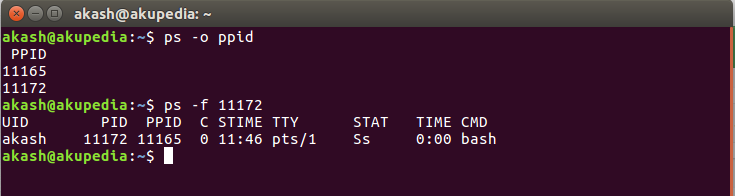
Use
ps -o ppid=
- e.g.
ps -o ppid= 2076returns2054, which you can easily use in a script etc.ps -o ppid= -C foogives the PPID of process with commandfoo. You can also use the old fashionedps | grep:ps -eo ppid,comm | grep '[f]oo'. - Fuller explanation:
ps -f 2072returnsUID PID PPID C STIME TTY STAT TIME CMD izx 2076 2054 0 07:16 ? S 0:00 /usr/lib/pulseaudio/pulse/gconf-helper
- The
pstreerelation is:pstree -s -p 2076:init(1)───pulseaudio(2054)───gconf-helper(2076)
OR
Step 2:-
echo $PPIDif you need the command from this parent pid:
cat /proc/$PPID/commif you need the full command line (with all options):
cat /proc/$PPID/cmdlineExplanation
$PPIDis defined by the shell, it’s the PID of the parent process- in
/proc/, you have some dirs with the PID of each processes. Then, if youcat /proc/$PPID/comm, you echo the command name of the PID
That’s it for now !